Site Features

Symbol Links

Option Chain

Advanced Stock Chart

Historical Price Return Distribution Report

Forward-Looking Earnings Dates Report

Recent Dividend Announcements and Guidance Report

Future Ex-Dividend Dates Report

Option Repeat Trade Screener

Option Order Flow Sentiment Screener

Week-by-Week ATM Straddle Performance Report

Symbol ATM Straddle Performance

Seasonality Screener By Calendar Month

Seasonality Monitor By Calendar Month

Earnings Stock Pattern Screener

Earnings Option Strategy Screener

Event-Driven Historical Insights

At-the-Money Option Straddle Screener

Large Dollar Volume Burst Trades

Option Contract Analytics

Option Contract Historical Data Analytics

Option Contract Implied Volatility Chart

Option Contract Time And Sales

Option Contract Single-Leg Trades

Option Contract Multi-Leg Trades

Unusual Options Activty

How to use the earnings calendar

How do I cancel my subscription?

Glossary

Glossary

Financial Concepts

Stocks vs. Options

Dividends

Earnings

ETFs and ETNs

Bid-Ask Spread

Theoretical Edge

Relative Strength Performance

Stock Seasonality

Payout Diagrams

Option Delta Volume

Options Basics

Introduction

Brokerage Account

Option Chain

Open Interest

Delta

Gamma

Theta

Vega

Rho

Volatility

Skew

Cost of Carry

Option FAQs

Options Trading

Option Strategies Overview

Put Protection

Buy-Write

Synthetic Stock Positions

Delta Neutral Trading

Multi-Leg Option Trade Analyzer

Multi-Leg Option Trades Screener

Misc.

Stock Order Imbalance

Threshold List

How To

How to Trade Around Earnings

How to Find a Bull Call Spread for a Specific Stock

How to Use an Options Profit Calculator

How to Find a Stocks Historical Price Moves Around Earnings

How to Subscribe to Market Chameleon from Interactive Brokers

Future Ex-Dividend Dates Report

Provides a comprehensive list of equities with upcoming Ex-Dividend dates, either announced or projected. Lists may be filtered and sorted to highlight selected stock attributes.

The Future Ex-Dividend Dates Report is fully functional for premium subscribers.

Why It's Important

With thousands of publicly-traded U.S. companies paying regular dividends, investors have a wide variety of alternatives when looking to add dividend income to their portfolios. Searching for stocks with upcoming Ex-Dividend dates can provide clues as to when to invest to capture the dividend, as well as how upcoming payment dates will affect income distribution. Click here to learn more about dividends.

How To Find It

From the main menu go to Dividends > Future Ex-Dates (or Click here).

How To Use It

  1. Select options from filters to refine search by Watchlist, Ex-Date, Stock Type, Market Cap, etc.

Filters available in the Future Ex-Dividend Dates Report

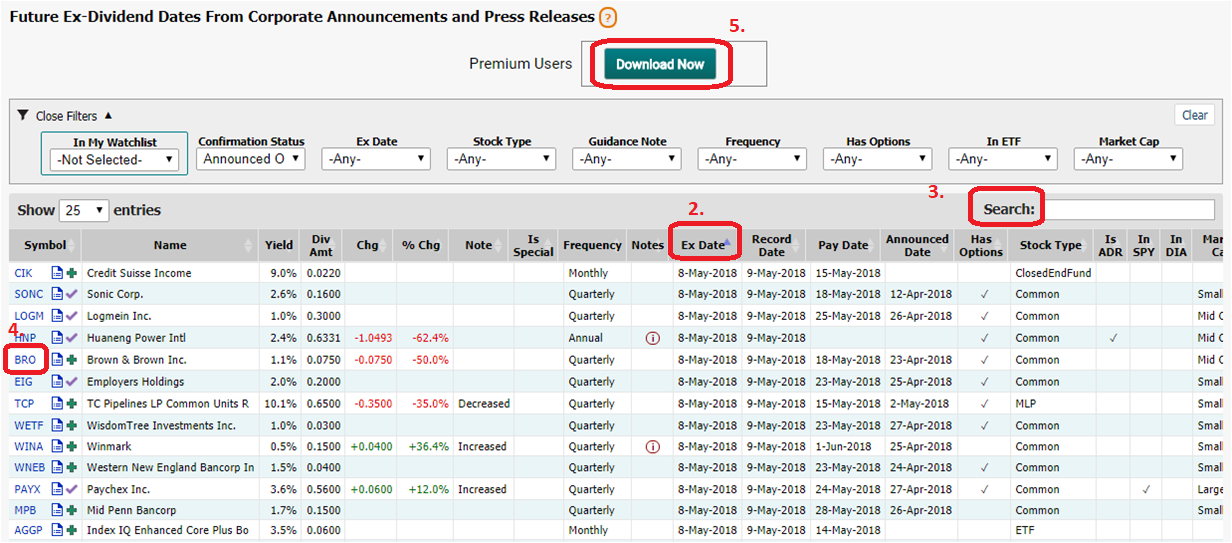
  1. Sort the Table by clicking on column headings
  2. Search for keyword or specific stock symbol
  3. Click on Symbol Link or Fact Icon for more detail on a specific stock
  4. Optionally click on "Download Now" button to download the table as a CSV file for use in Excel

Sorting and searching features available in the Future Ex-Dividend Dates Report

Example: Using the Download Feature To Refine Your Search

The table below has been filtered for all stocks in the S&P 500, with Announced Ex-Dividend dates in the next 30 days, and for which Options are actively traded. The search identified 151 stocks.
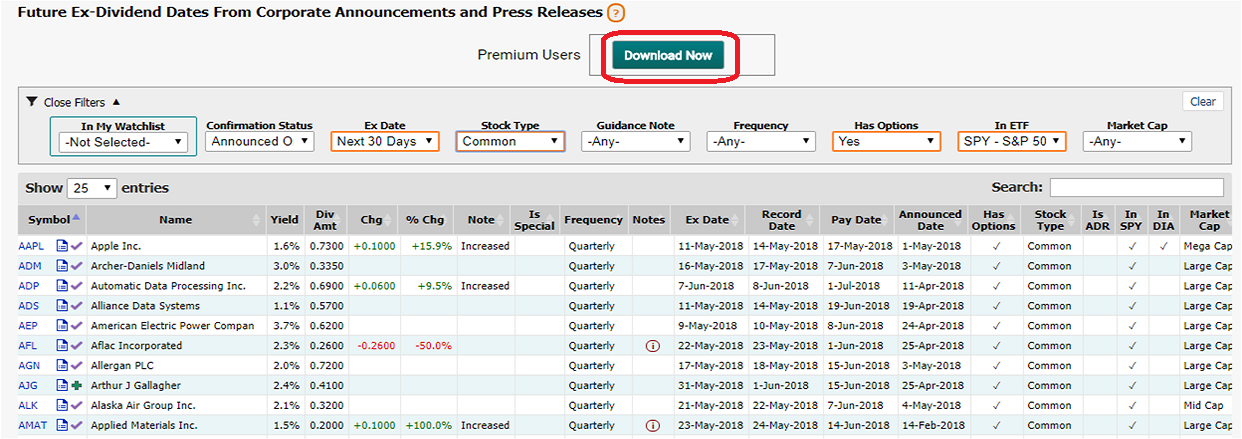
Downloading data in the Future Ex-Dividend Dates Report

The Excel spreadsheet below is downloaded to your personal computer. To conduct additional filtering and search, highlight the first row by clicking on the first row header (which contains column headings), move the cursor to Sort & Filter, and select Filter. Drop-down arrows should appear in the cells of the top row which can be used to perform compound and numerical filtering.
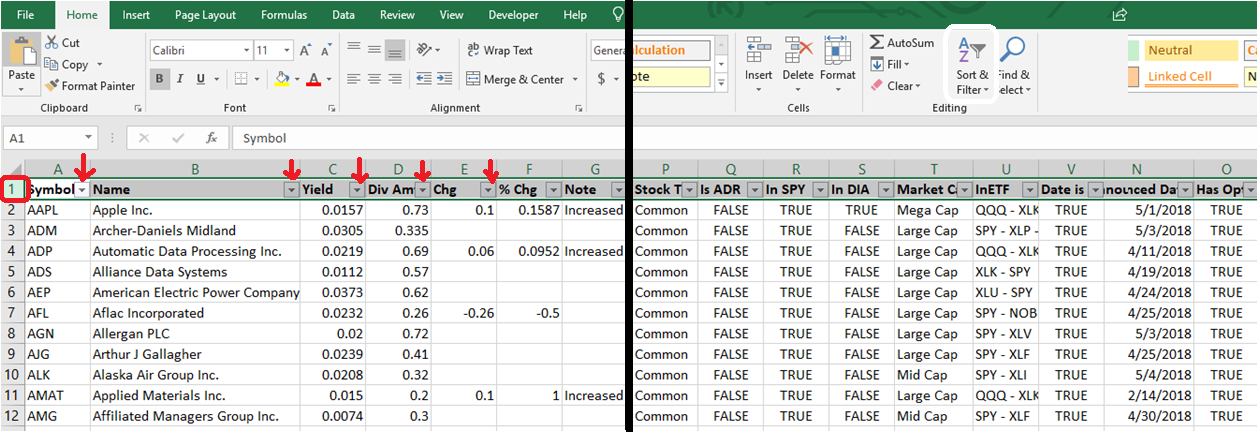
Refining the Future Ex-Dividend Dates Report Data in Excel 1/2

To find stocks which have yields greater than 2.5%, and which have Increased their dividends: (a) click on the Filter icon in the Yield Column, highlight Number Filters, and click Greater Than….; enter ".025" and hit return; (b) now click on the Filter icon in the Note Column, and select "increased". The result has filtered the initial list of 151 stocks down to 12 candidates
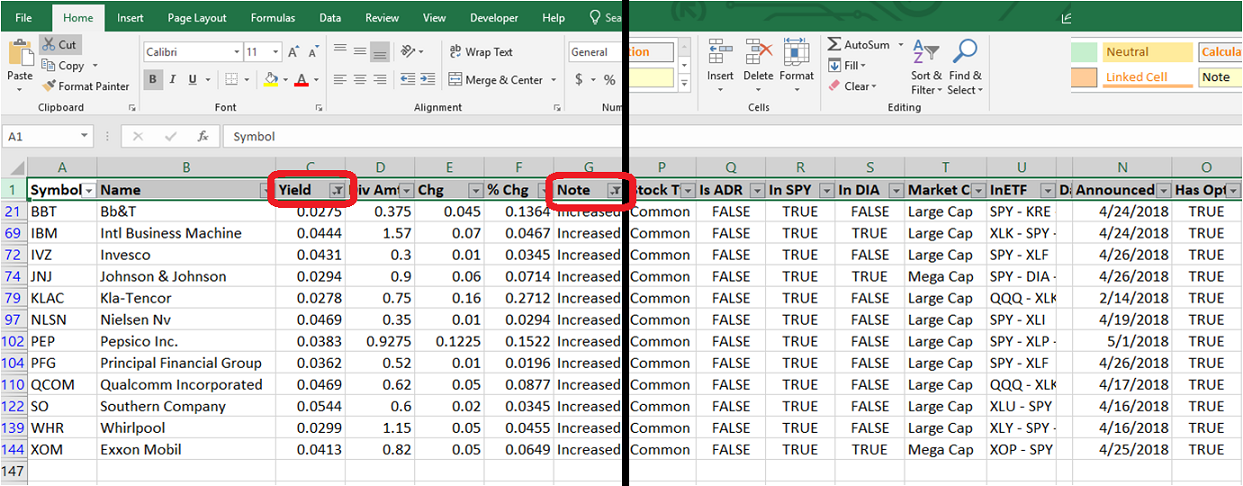
Refining the Future Ex-Dividend Dates Report Data in Excel 2/2

Market Data Delayed 15 Minutes